Thursday, April 22, 2010

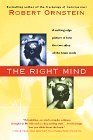
Robert Ornstein's THE RIGHT MIND

When people think of language and the brain, they often refer solely to the left hemisphere of the brain because that is where the identified language centers reside (e.g., Wernicke's Area, Broca's Area). However, it would be a mistake for anyone to think that you need only the left hemisphere to communicate and use language. Robert Ornstein's book The Right Mind reminds us why we need the right hemisphere just as much--if not, perhaps, more--than we need the left hemisphere for things like using language and making logical decisions (both aspects associated primarily with the left hemisphere).


Ornstein's style of writing is not terminology-laden, so even people who have never studied cognitive science or anatomy or neuroscience or [fill in the blank with another relevant field here] will be able to pick up the book and read about the wonders of the right hemisphere. The chapters have fun names to go with the interesting topics like "The Run of Dichotomania," "Wit or Half-Wit?" and "An Avalanche in the Human Brain."

Throughout the book, Ornstein uses examples from psychological and linguistic experiments, patients with brain damage, and general observations to demonstrate that while the left hemisphere may be responsible for language at its core, the right hemisphere is necessary for being able to understand context, which allows us to form the "big picture" of our world. In other words, the left hemisphere helps us see the individual trees, but the right hemisphere allows us to see the entire forest. Through Ornstein's examples, you begin to see that a world without context is one without true understanding.

If you're interested in understand more about how our brains process language, I highly recommend getting your hands on a copy of The Right Mind.

Tuesday, April 20, 2010

Live on Twitter!

After more than one request, I have turned the fictional "SFALingProf" Twitter account from the posters I've put up around campus into a real one. You can join in on the fun by following me on Twitter, either by clicking on the Follow Me button in the right-hand sidebar or by going to Twitter and searching for my username (SFALingProf).

Wednesday, April 14, 2010

Why aren't 341 and 438 showing up on the Fall 2010 schedule?

In Fall 2009, I was ecstatic that my colleagues of the Department of English approved all the new linguistics courses I had proposed. Little did I know that the departmental approval would only be the first step in a long journey...

After the department approved the courses, the courses were passed up to the College Council; once they approved the courses, the courses were passed up to the College of Liberal and Applied Arts for approval. After getting approved three times, they got passed again, this time to the Provost and then again to the Board of Regents.

The courses have passed all those stages of approval, and yet they are not showing up on the fall schedule. Why? Because they still have to get a stamp of approval at the state level (and three different state levels, at that).

What does all this mean to you? It means that those linguistics courses with new course numbers (ENG 341: Introduction to Linguistics and ENG 438: Forensic Linguistics) are not showing up on the official Fall 2010 course schedule. But are they going to be offered in the fall? YES!

While 341 and 438 will be offered in the fall, it will most likely be around summer before those courses get all the appropriate stamps and get put onto the schedule. That means you won't be able to register for those courses until then--you can't register for a course not showing up on the schedule.

The poster you'll see around the department to advertise the "missing" courses.


If you are interested in taking 341 and/or 438, please reserve a spot in your fall schedule for the course and register as soon as it appears on the schedule. I will post again (here on this blog) when the courses are officially up, so you can check back here for updated information.

ENG 341: Introduction to Linguistics MWF 10:00-10:50
ENG 438: Forensic Linguistics TR 9:30-10:45

I realize this delay is a bit of a pain (okay, more than just a "bit" of a pain), but please don't disregard these courses because of the hiccup in getting them on the official registrar's schedule. We are really excited to be offering so many linguistics courses in the fall and appreciate all the student support we are getting. Please help spread the word about these "invisible" courses so that they will fill when they make their way to the schedule.

Forensic Linguistics and the Facebook Killer

For anyone asking what forensic linguistics is or what forensic linguists do, you should watch Dr. John Olsson's YouTube video. His video documents the types of comparisons and critical analysis necessary to work with forensic linguistic investigations of language use.

Watching the video will give you a sense of what types of information you can get from language, the types of conclusions you can draw about language use, and how critical analyses of language can help in investigations.


You may have noticed that Dr. Olsson's conclusion was that Chapman "could not be excluded from the authorship of the later texts sent from the teenager's phone." On the surface, that may sound like a vague conclusion, yet it was important to the case. Why do you think such a conclusion was important? Furthermore, why do you think it would not be possible for Dr. Olsson's conclusion to be that Chapman was definitely the author of the text message?

If this video sparks interest for you, you might want to think about taking ENG 438: Forensic Linguistics in the fall.

Wednesday, March 31, 2010

Good for a Laugh

As everyone at SFA is getting ready for a five-day weekend, I want to send you home with a linguistic jewel straight from the headlines:


I can't take credit for this Leno-worthy headline. Thank you to SPOGG for finding and posting such a headline.

English is a great language for humorous headlines because of its ability to flout ambiguity. The ambiguity in the headline above is one caused by the word package, which as you all undoubtedly know has more than one meaning (and the intended meaning is not the first one we English speakers tend to think of). That type of ambiguity is semantic (or lexical) ambiguity--it is ambiguous because a word/phrase has more than one meaning.

Sometimes, though, sentences (or headlines) are ambiguous because the structure is ambiguous: "Children Cook & Serve Grandparents" (this was a headline featured on Jay Leno). The ambiguity starts with the verb cook, which could take a direct object (I cooked the turkey) or could appear as an intransitive verb (I cooked). The ambiguity then continues with the verb serve, which could take an object that is being served (I served the turkey to my guests) or could take an object indicating the servees (I served the guests). When you put the two together, it's literally a recipe for disaster for a headline.

Another famous ambiguous headline is from WWII: "The Fifth Army Push Bottles Up Germans." What kind of ambiguity do you think that is?

As you're on a break, peruse newspapers and send me any fun headlines you find--I'll feature them in a blog posting.

Tuesday, March 23, 2010

Note on Course Schedules

First, I'd like to thank everyone who participated in the poll on the choices for courses in Fall 2010. Every choice got at least one vote, so it's nice to know we're thinking of course options that students are actually interested in. I'm not all that optimistic in the poll counter's ability to compile statistics, though; if anyone else bothered to add up the percentages, you noticed that 170% of the votes were accounted for. Hmmm... I may not be a mathematician, but that sounds a little suspect.


The two more advanced linguistic courses being offered in the fall are Forensic Linguistics and Psycholinguistics (which is being run as a Topics in Linguistics course). You may have seen the posters floating around LAN and Ferguson to that effect (I'm including the poster images in this blog post--some people seem to like my posters and have been stealing them off walls... Please leave them up until after registration has ended!).


Second, some of you may have looked at the online version of the fall schedule and noticed that two linguistics courses are missing for the fall: ENG 341: Introduction to Linguistics and ENG 438: Forensic Linguistics. Those courses are being offered under brand new numbers, so the numbers for those courses don't exist in the school's system quite yet. Our department chair is hard at work to fix the situation, so please don't worry if you don't see those two courses on the schedule. They are indeed on the departmental schedule of courses to offer in the fall--there are just extra steps the department has to take to get them recognized by the school's scheduling system since the course numbers are new ones.


Third, I am quite pleased with the amount of response I've been getting from students about the fall courses; however, I'd like to remind you all that the fall courses can only be offered if students actually register for them. As registration draws nearer, please remember that only courses that fill can run. If you're excited about a course offering, tell other students about the course; if you know a student who might be interested in a linguistics course, tell them what's being offered. In other words, please help spread the word around campus.

While I am only advertising Introduction to Linguistics, Forensic Linguistics, and Psycholinguistics through posters, there will also be three sections of ENG 344: Structures of English offered for those students who need that course.

And, finally, I don't want to forget to mention the summer courses being offered.


There will be a section of Structures offered for each Summer Session, and during Summer Session I, we will be offering our first ever (as far as I know) graduate-level linguistics course.

In the next few weeks, I'll be doing as much as possible to promote these courses to make sure they fill, and I'll also be promoting the new Linguistics Minor to make students aware of that option. I've even considered wearing one of those sandwich board signs with linguistics posters on them around campus... but I think that might be a tad too conspicuous (even for me).

Thursday, March 4, 2010

Spotlight on Linguistic Tools: SIL's IPA Unicode Keyboard

A month ago, I started a new (hopefully regular) feature where I would post on linguistic tools that can help students.  The first linguistic tools post focused on the online IPA TypeIt keyboard.  This time I'm going to focus on another way you can type in IPA on your own computer: downloading an SIL IPA Unicode keyboard.  That may look like a hefty title to get through, so I'll break down the title for you before I even begin to go into the keyboards.

"SIL" stands for Summer Institute of Linguistics and is an organization that works with language development (i.e., they help communities keep their languages alive through such endeavors as helping speakers develop a writing system for their language or a curriculum in school for their language).  As such an organization, they also work on promoting linguistic tools that make it easier for linguists to work with data and analysis; they develop programs, but they also include links and research on other programs that might be helpful.  One development of theirs is a set of IPA unicode keyboards.

The unicode in that title is important because it means that whatever you type into your document using the unicode keyboard will be translatable to any document that accepts unicode fonts, which is pretty much every computer application.  As some students may have noticed, sometimes when you type in IPA, not all fonts or applications will recognize the symbols and will produce empty boxes or off-looking characters that you didn't intend to have in your document.  If you're using a unicode font and enable unicode encoding on whatever you're working on (e.g., a webpage, a paper), the symbols will show up beautifully.  If you're interested in learning more about unicode, you can visit the Unicode Consortium webpage.

To use one of the SIL IPA Unicode keyboards, you first need to download one onto your computer.  The site offers keyboards that are compatible with Windows, Mac, and Linux, so make sure you click on the right keyboard that will work with your computer's operating system.  Oh, and I almost forgot to mention one of the most student-friendly aspects about the SIL keyboards: they're free.  The keyboards are pretty amazing because they not only offer you the ability to type all the IPA symbols of world languages (not just English), but they also offer you the ability to add in suprasegmentals and diacritics.  When you click on the link above, you'll be taken to a site that looks like this:


Again, make sure you click on the keyboard that will work with your computer's operating system.  For every keyboard, the site also offers downloadable PDF guides that will help you through the downloading and installing processes and will show you how to use the the keyboard once it's installed on your computer.  An important note on the website is that you have to restart your computer after installing the keyboard to be able to use it; otherwise, you'll get frustrated when your new cool keyboard doesn't do what it's supposed to do (that piece of advice is from personal experience).  Use those PDF guides--they'll do a much better job than I could hope to do of explaining everything you'll need to do to get your keyboard in place.

Before you start using your newly installed keyboard, you'll also need to make sure you have a font that will work with all the new IPA capabilities your keyboard offers you.  While most fonts will work with the IPA symbols themselves, not all fonts are capable of working with the diacritics and suprasegmentals that SIL's IPA keyboards offer.  To get the most out of your new keyboard, SIL offers a free font download of Duolos SIL, a font that looks similar to Times New Roman and has the compatibility with all the IPA goodies.

When the keyboard is installed on your computer, it allows your regular keyboard to function as an IPA keyboard (you can easily switch between the two in your computer's keyboard language options).  The keyboard works for the most part like your typical keyboard (e.g., if you press the t-key, a t will appear on the screen), but it has "deadkeys" that allow you to do combinations to produce the IPA symbols.  For example, if you hit the = button, a yellow box will appear on your screen.  The letter you press next on the keyboard will determine what IPA symbol will appear; here is an image from the guide that comes with the keyboard:


There are several more of these deadkeys that make it possible to get all the IPA symbols and notations onto one keyboard.  About now, you may be asking yourself, "But what if I want to actually put the = sign into my document?  If it's a deadkey, how does that work?"  If you simply hit the spacebar after typing in =, the = will stay in your document.  Here is another image to show you what I mean by "deadkey":


The top line is what happened when I hit = and then the spacebar; the middle line is what happened when I hit = followed by i; the bottom line is what it looks like when I hit a deadkey--the yellow box around the symbol lets me know I've hit a deadkey and that pressing another key in the combination will change the symbol (i.e., the = sign will disappear and be replaced by another symbol).  It's a pretty cool system.

To show you just some of the capabilities of the keyboard, here is an image of the IPA consonants and how you produce them using the IPA keyboard:


The keyboard is an amazing tool, and it's even customizable--you can download programs that will allow you to change keystrokes or even add more.  For anyone who wants to be able to type in IPA without needing to use an online tool, without needing to interrupt their typing by clicking on a box above a text box, and without needing to leave the document being worked on to type into a text box and then copying and pasting it.

ɑɪ ʤʌst swɪʧt tu mɑɪ ɑɪ pi eɪ kibɔrd ænd æm tɑɪpɪŋ wɪθ mɑɪ kəmpjutər lɑɪk rɛgjulər

How cool is that?